wfx-loot: hijacked GitHub accounts spread a CI secret stealer

On this page
Since November 10, 2026, a campaign dubbed wfx-loot has been using real, hijacked GitHub accounts to plant a secret stealer in the CI (continuous integration) of thousands of repositories. The malicious code gets in, runs and leaves within seconds, taking with it whatever cloud keys, package publishing tokens and AI keys the pipeline can read.
Below: how the attack works, why reviewing the current code is not enough, and what to check in your repository, even if your team is small.
#What happened
According to Aikido, the campaign started at around 12:45 UTC on November 10. Using credentials for 4,837 accounts, the attacker opened probe pull requests (PRs) titled docs: dependency audit notes in 61,764 repositories. The PR itself does nothing: it only tests whether the account can write to the repository. If one showed up in yours, the account that opened it is compromised.
Where write access worked, the real attack followed. At 21:35 UTC on November 12, Endor Labs counted 8,926 repositories with malicious commits and at least 1,806 with stolen credentials; Aikido says at least 1,835. The total may be higher, because the attacker deletes the records, and Endor Labs still described the campaign as active on November 13.
Victims include nextcloud/docker and 20 WebdriverIO repositories, where the commits came in through the WebdriverIO Bot account, an automation allowed to bypass branch protection.
At least 50 of the accounts publish packages, and both companies advise removing digitalelvis/neuronai-studio 3.14.3 (Packagist) and github.com/onuragtas/docker-env v1.0.278 and v1.0.280 (Go). How the credentials leaked has not been confirmed yet.
#Three ways in
All three variants deliver the same script, about 1,500 lines long:
- A new step in an existing workflow, in a commit called
ci: refresh build cache. - A
postinstallhook inpackage.jsonthat calls a hidden.ci-xxxxxx.shscript (commitchore: add ci helper). It runs on anynpm install, including on a developer's laptop. - A throwaway workflow,
build-audit-xxxxxx.yml, on achore/...branch (commitchore: add dependency audit workflow).
#The sandwich: why the current code fools you
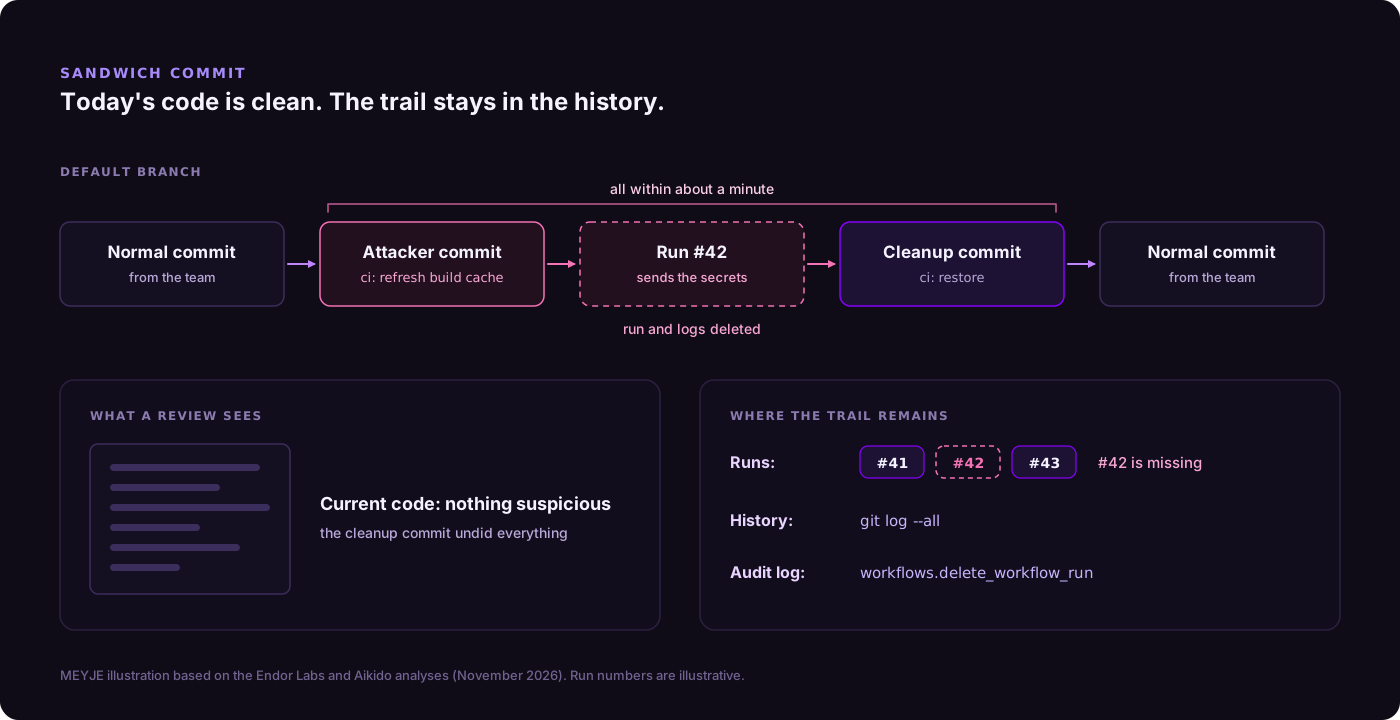
Endor Labs calls the technique a sandwich commit. The malicious commit lands on the default branch between normal-looking commits, the workflow runs, and a cleanup commit (ci: restore or ci: cleanup) undoes everything within seconds. Then the attacker deletes the run and its logs.
Anyone who opens the repository today sees clean code, and a tool that only scans the current state finds nothing. The trail lives in the commit history and in a gap in the Actions run numbers: if the list jumps from run 41 to run 43, someone deleted run 42.
According to Aikido, the script also posts fake "success" status checks using the names of the required checks. Branch protection matches the name, not who posted it, and lets it through.
#What it takes
Actions secrets and variables, the GITHUB_TOKEN, OIDC tokens (OpenID Connect, the passwordless login between GitHub and the cloud), AWS, Azure, GCP, npm and PyPI credentials, AI provider keys (OpenAI, Anthropic, Gemini, Hugging Face and others) and .env files.
Then it exchanges the OIDC tokens for cloud sessions, creates long-lived keys and leaves doors open to come back:
- on AWS, it rewrites a role's trust policy to accept
"AWS": "*", meaning any AWS account; - on Azure, it adds
wfx-ci-...federated credentials, which keep working after the tokens are rotated.
That is why order matters. According to Endor Labs, the fifth version of the script went back to 1,838 repositories that earlier versions had already hit. Rotating a key without closing the door just hands over the new key.
#The third campaign in about five weeks
- GhostAction (new wave on October 8). According to StepSecurity, two maintainer accounts were used to push the
security-audit.ymlworkflow to 345 repositories, with AI keys already a prominent target. - Gheist (disclosed October 25). Wiz found more than 13,500
ci-sync-...branches coming from more than 850 accounts. The workflow printed encoded secrets to the log to slip past GitHub's masking, and the attacker downloaded the log and deleted the run.
Aikido sees wfx-loot as a separate campaign from GhostAction, but with overlap: accounts hit by GhostAction were more likely to be hit again.
GitHub has been tightening the rules. Since July 28, suspicious runs in public repositories wait for approval, which, according to Wiz, stalled Gheist there. The pull_request_target trigger will be blocked by default in public repositories starting December 2 (there is a test block on November 16, from 16:00 to 18:00 UTC). And secret scanning of Actions logs entered preview on November 9, on Enterprise Cloud only. None of this replaces the basics: every account with write access is a key to the house.
#A checklist for your CI
#If you may have been hit
- Search the history for the attacker's commits:
# Attacker commits since the campaign started
git log --all --since=2026-11-10 --format='%h %an %ad %s' \
  --grep='ci: refresh build cache' \
  --grep='chore: add ci helper' \
  --grep='chore: add dependency audit workflow'

# Commits that touched postinstall (catches the reverted ones too)
git log --all --since=2026-11-10 -S 'postinstall' --oneline -- '*package.json'- In the Actions tab, look for gaps in the run numbers. In organizations, the audit log records deletions as
workflows.delete_workflow_run; on Enterprise Cloud, pushes (git.push) do not show up in the web interface, and the API keeps them for only 7 days. - Close the probe PRs and delete any
wfx-docs,chore/*andci-check-*branches you did not create. - Revoke sessions, tokens, SSH keys and OAuth grants for the accounts involved. Only then rotate the secrets the workflows could reach.
- In the cloud, look for trust policies with
"AWS": "*", IAM keys created since November 10 andwfx-ci-*federated credentials in Azure.
#To close the door
- Minimal permissions:
permissions:in every workflow, withcontents: readas the default, and more only on the job that needs it. - OIDC with narrow scope and short lifetime: the cloud accepts only the right repository and environment (the
subclaim, such asrepo:my-org/my-app:environment:production) and hands out sessions that last minutes, not fixed keys. - Actions pinned by SHA, not by tag, which can be moved.
- Branch protection without shortcuts: no direct pushes to the default branch, not even from admins; required review on
.github/workflows/**; required checks tied to a specific GitHub App; no bot with a free pass. - Be careful with
pull_request_target: it runs with the repository's secrets, so never run code from a fork in it. - Install scripts under control:
npm ci --ignore-scriptswherever possible, and treat a new hook inpackage.jsonas a sensitive change.
A lean workflow that follows these rules:
name: CI
on:
  pull_request:
  push:
    branches: [main]

# By default, the workflow token can only read the repository
permissions:
  contents: read

jobs:
  tests:
    runs-on: ubuntu-latest
    steps:
      # Action pinned to the commit SHA; the version goes in the comment
      - uses: actions/checkout@3d3c42e5aac5ba805825da76410c181273ba90b1 # v7.0.1
        with:
          persist-credentials: false
      - run: npm ci --ignore-scripts
      - run: npm test

  deploy:
    needs: tests
    if: github.ref == 'refs/heads/main'
    runs-on: ubuntu-latest
    environment: production
    permissions:
      contents: read
      id-token: write # only this job can request an OIDC token
    steps:
      - uses: actions/checkout@3d3c42e5aac5ba805825da76410c181273ba90b1 # v7.0.1
        with:
          persist-credentials: false
      - uses: aws-actions/configure-aws-credentials@e1253824e5c10ff9df46874f81ed3ec929e19cfd # v6.3.0
        with:
          role-to-assume: arn:aws:iam::123456789012:role/deploy-site
          aws-region: us-east-1
          role-duration-seconds: 900 # 15-minute session
- run: ./scripts/deploy.sh#What this changes for people who build products
Look at what the script hunts for: OpenAI, Anthropic, Gemini, Hugging Face. The model key is no longer a configuration detail: whoever holds it spends on your account.
At MEYJE we build AI agents and systems for clients, plus RuralZap, an AI-powered financial assistant for agribusiness on WhatsApp. Our recommendations:
- A CI job that does not need a secret does not get one. The AI key used in tests is separate and has a low spending limit.
- One key per environment and per client, so a leak has a small blast radius.
- Automation accounts are high-risk accounts. A bot with a free pass on branch protection is exactly what the attacker is looking for.
- Rehearse key rotation. If rotating every key takes a day, the attacker gets a day.
Want to review the CI and AI keys of your systems? Talk to us.
Sources
- Compromised GitHub accounts push CI secret stealer to tens of thousands of repositories (Aikido, Nov 12, 2026)
- GitHub Actions supply chain attack targeting CI secrets at scale (Endor Labs, Nov 12, 2026, updated Nov 13)
- GhostAction returns (StepSecurity, Oct 9, 2026)
- Gheist: attempted scaled abuse of stolen GitHub tokens stumbles (Wiz, Oct 25, 2026)
- pull_request_target blocked by default on December 2 (GitHub Changelog, Nov 2, 2026)
- Secret scanning detects secrets in GitHub Actions workflow logs (GitHub Changelog, Nov 9, 2026)